The jsonresult of date time is serializing to the string /Date and some integer value starting with 1970 . The problem is that the browser interprets this value accordingly to the LOCAL TimeZone – and thus the same date is going to be interpreted with a difference.
I was thinking that I can adjust from UTC time offset of the server( obtained with .NET from TimeZoneInfo.Local.BaseUtcOffset.TotalMinutes) and the UTC time offset of the client( obtained with (new Date()).getTimezoneOffset() + UTCServerMinutes; ). Unfortunately, the code does not work for SAMOA ( 13 hours difference).
Pay attention that the server is sending SAME data – just the browser is interpreting from the local user time zone.
So the solution is to convert the date to a string ( I have chosed yyyy-MM-ddTHH:mm:ss) and interpret in javascript( see date2 below).
The server code – I have put my birthdate 16 april 1970


I was thinking that I can adjust from UTC time offset of the server( obtained with .NET from TimeZoneInfo.Local.BaseUtcOffset.TotalMinutes) and the UTC time offset of the client( obtained with (new Date()).getTimezoneOffset() + UTCServerMinutes; ). Unfortunately, the code does not work for SAMOA ( 13 hours difference).
Pay attention that the server is sending SAME data – just the browser is interpreting from the local user time zone.
So the solution is to convert the date to a string ( I have chosed yyyy-MM-ddTHH:mm:ss) and interpret in javascript( see date2 below).
The server code – I have put my birthdate 16 april 1970
1
2
3
4
5
6
7
8
9
| DateTime res = new DateTime(1970, 04, 16, 22, 0, 0);[HttpPost] public JsonResult GetDateBirth() { var str = res.ToString("s"); return Json(new { date =res, datestring=str, ok = true }); } |
The Javascript code:
01
02
03
04
05
06
07
08
09
10
11
12
13
14
15
16
17
18
19
20
21
22
23
24
25
26
27
28
29
30
31
32
33
34
35
36
37
38
39
40
41
42
43
44
45
46
| function GetJsonDate() { $.ajax({ type: "POST", url: '@Url.Action("GetDateBirth")', datatype: "JSON", contentType: "application/json; charset=utf-8", success: function (returndata) { if (returndata.ok) { window.alert('The server is sending:' + returndata.date + " -- " + returndata.datestring); var d = parseInt(returndata.date.substr(6)); var date1 = new Date(d); var date2 = dateFromSortable(returndata.datestring); var date3= getDateString(returndata.date); window.alert('original: ' + date1 + '\r\n' + ' iso correct:'+ date2 + '\r\n'+ ' utc difference not good:' + date3); } else { //this is an error from the server window.alert(' error : ' + returndata.message); } } } ); } function dateFromSortable(dateStr) { var parts = dateStr.match(/\d+/g); return new Date(parts[0], parts[1] - 1, parts[2], parts[3], parts[4], parts[5]); } function getDateString(jsonDate) { //does not work correctly for SAMOA - it have some hours difference var UTCServerMinutes = @serverMinutes; if (jsonDate == undefined) { return ""; } var utcTime = parseInt(jsonDate.substr(6)); var dateUtc = new Date(utcTime); var minutesOffset = (new Date()).getTimezoneOffset() + UTCServerMinutes; var milliseconds = minutesOffset * 60000; var d = new Date(dateUtc.getTime() + milliseconds) return d; } |
How to test it:
Run the project. Click “Get Json Date” – and you will see the three dates equal.
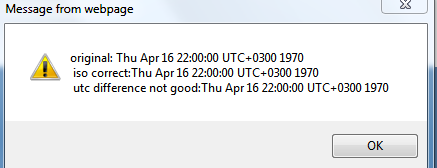
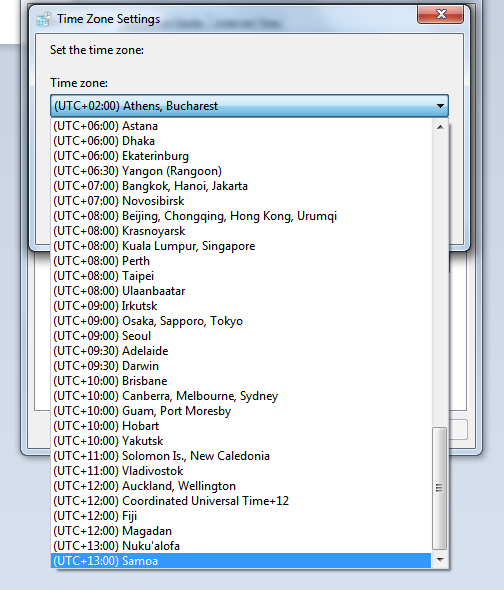
Now change the time zone to Samoa ( or other, if you live in Samoa  )
)
)
Click again on “Get Json Date” – the date will same 16 april 1970 just for the date2 – obtained from dateFromSortable javascript function.
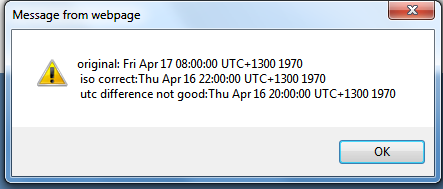
Please note that the local time zone is NOT affecting the values transmitted via ViewBag/ViewData/Model, but just the ones transmitted via Json.
